Back to the free toolPHOTO TO VIDEO

AI product video generator from a photo

Turn one product photo into a short AI video with a slow camera move. Watch a real amber-bottle output, use its editable prompt, and try the same direction with your own image.

MP4PHOTO TO VIDEO
ONE-TIME FREE TRIAL Google sign-in currently required Eligible new accounts: 12 one-time credits Review the credit cost before Generate
Image-to-video workspace

Create a video from your product photo

Start frame
Leave blank for AI-enhanced motion.0/500 characters

Prepare your image and settings. Sign in to check your allowance and generate.

This video
Checking cost…
Balance
Checking balance…
This output
Checked with your quote

Guest and account workspaces are separate. After signing in, upload your image and review your settings before generating.

Checking for an unfinished request from this browser…

Trial & account details

Compare the photo with its actual video

Watch the original output, inspect what changed, then use the prompt with your own photo.

This input is demo artwork. The video is an actual Pro-account output generated on September 9, 2026; free-account videos include a watermark. The prompt describes the intended motion, which the output may not follow exactly.

Product — move the camera, preserve the object

An amber bottle makes a useful test: the reflections may move, while the cap, silhouette and base should stay consistent.

Shown here: a camera move around an amber bottle. Use the original prompt with your own image, or explore the suggested variations later on this page.
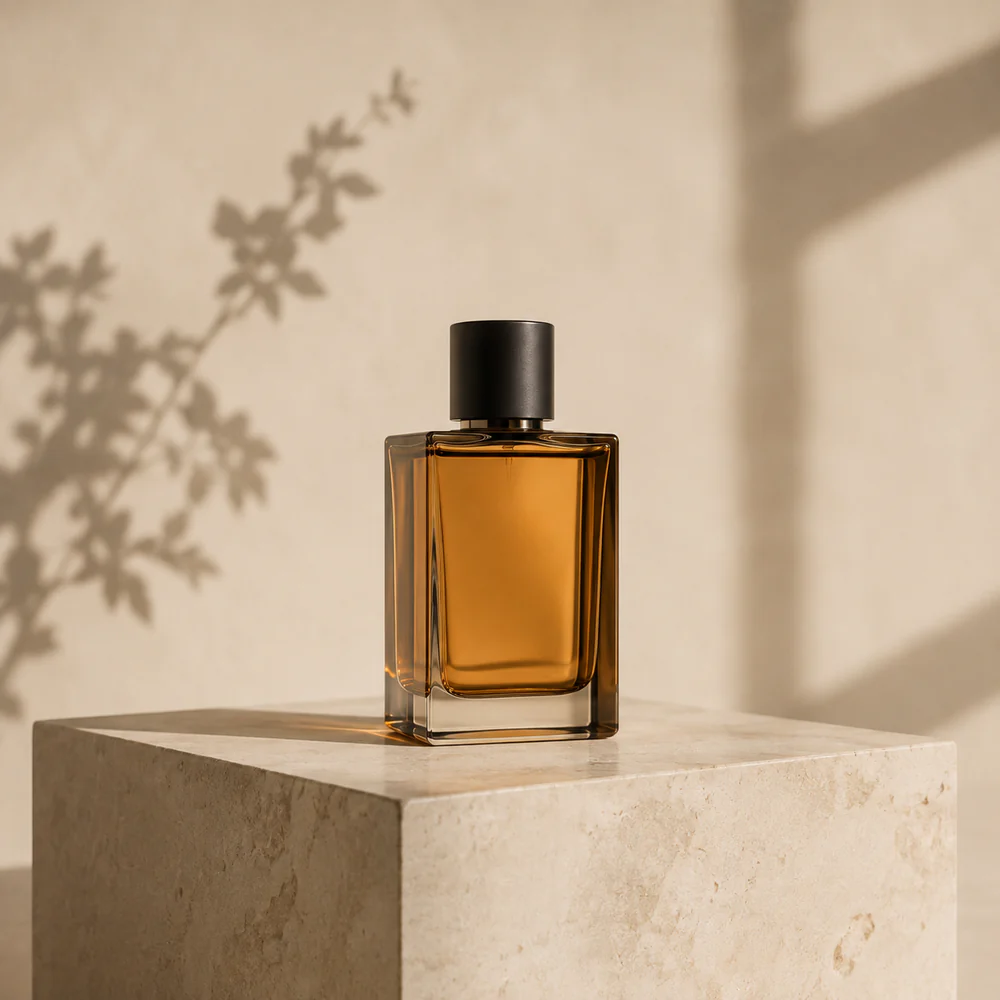
AI-created amber glass bottle with a dark cap on a pale stone plinth
Input imageAI-created product input
Actual video outputGrok Imagine 1.5 · requested 480p / 5s · Pro output
Motion prompt

A slow subtle camera orbit around the amber glass bottle. Warm window reflections move gently across the glass. Keep the bottle, cap and stone plinth rigid and unchanged. Preserve the background and composition. No cuts, no new objects, no text.

Add your own image, then review and Generate.

What to look for

In this take, the camera progressively moves around the bottle. Watch whether its edges and cap remain stable as the reflections change.

Open original MP4

Curious how the same image looks with different models?

Compare the model outputs Animate your photo
01
CHOOSE YOUR MOTION

One product, one shot, one clear movement

Make a short moving product shot for a listing, presentation or social edit. Start with a well-lit photo and one camera direction, then compare the result with the original packaging.

HOW IT WORKS01

How to make a product video from a photo

  1. Choose a clean product image. Upload a JPG, PNG or WebP up to 10 MB. Keep the whole object in frame with space around its edges. A simple background makes changes to the silhouette and reflections easier to spot.
  2. Move the camera, keep the product still. Use the example’s orbit prompt, or choose the suggested push-in for a smaller camera move. A wide orbit asks the model to invent unseen sides of the product.
  3. Review the quote and the finished take. Choose the model and available settings, review the credit cost, then press Generate. Watch the whole result before downloading; compare labels, edges and proportions with the source photo.

What to check before you use the video

01

Read the label

Compare every readable word with the photo. Recreate essential product text as an overlay in an editor if the generated lettering changes.

02

Inspect the shape

Compare the cap, seams, corners and base with the photo. Check that their proportions stay consistent throughout the camera move.

03

Check unseen surfaces

Large rotations can invent the back of the object. Keep the motion smaller when your source only shows the front.

04

Finish your own edit

Add verified prices, offer terms, music and captions afterward. A generated showcase clip is one ingredient of a finished ad.

PROMPT TO TRY01

A slow product reveal

Prompt idea to try: move the camera toward the product rather than around it. This variation has no sample output here; inspect small lettering after generation.

Motion prompt

A slow, gentle camera push-in toward the product. The product remains rigid and stationary. Preserve the original shape, material, colors, packaging and background. Soft, consistent lighting. No cuts, no added objects, no added text.

Add your own image, then review and Generate.

PROMPT TO TRY02

Reflections across glass or metal

Prompt idea to try: keep the camera still and ask for moving reflections. This variation has no sample output here; compare the product and background after generation.

Motion prompt

Locked camera on the product. A soft window reflection moves gently across its surface while the product, cap and base remain still. Preserve the silhouette, color and background. No bending, no cuts, no new objects or text.

Add your own image, then review and Generate.

BEFORE YOU GENERATE

AI product video generator FAQ

Source images, motion, credit costs and downloads.

01Can I make a product video from just one photo?+

Yes. Upload one product photo and describe a simple motion. The model interprets details beyond the image, so exact geometry, lettering and colors can change. Compare the finished video with the original before using it.

02Does this import a Shopify, Amazon or product URL?+

This page accepts an uploaded image, not a store URL or catalog. Save a product image you have permission to use, then upload the file to the generator.

03Can I create an exact 360-degree product rotation?+

A single photo does not contain every side of a product. An AI orbit may invent hidden surfaces. For a precise 360-degree demonstration, use a real multi-angle shoot or a 3D workflow.

04Can I use it for ecommerce videos or ads?+

It can create a short product shot for your edit. Check that the result accurately represents your product and that you have the rights needed for the image, branding and final use. This tool does not guarantee advertising performance or platform approval.

05Is the AI product video generator free to try?+

Google sign-in is required to generate. Eligible new accounts receive 12 one-time credits, subject to anti-abuse checks and availability. Each model and setting has its own credit cost; review the quote before generating. Trial credits may not cover every option. Free-account output includes a watermark.

06What can I download?+

Preview and download the completed clip as an MP4. Available duration, resolution and credit cost depend on your chosen model. Check the current generator and pricing page for export and watermark conditions.

READY FOR ANOTHER FRAME?
Give your own photo its first movement.
Animate your photo