The trio-selfie reference
One camera, three solo moments, then everyone back in frame. This is the 19-second clip included in the creator.
19 seconds · 16:9 · Contains audio
Open creator Wondertake
Your crew, one front camera. Add up to three photos, one per performer, and any part left empty reuses your photos; the 19-second reference is included. Edit the prompt, review the sound and check the credit quote before generating. Faces and motion can vary.
Google sign-in required to generate.The front-camera turns and group ending are included. Upload your photos above.
Use the included clip or choose your own reference video here. Review sound in Settings. Reference time is included in the credit quote.
Playable reference and finished examples from SlapClip. These show the intended effect; they are not Wondertake generation results.
One camera, three solo moments, then everyone back in frame. This is the 19-second clip included in the creator.
19 seconds · 16:9 · Contains audio
Open creator11.6 seconds · With sound
Three friends take the same front-camera turns against a night skyline.
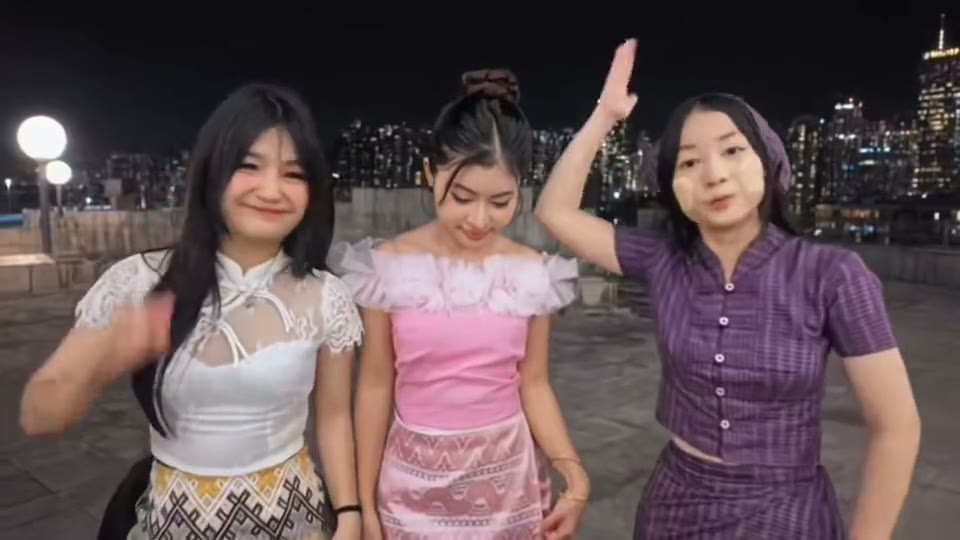
18.9 seconds · With sound
A school-robes scene follows the solo turns and quick pans of the reference.
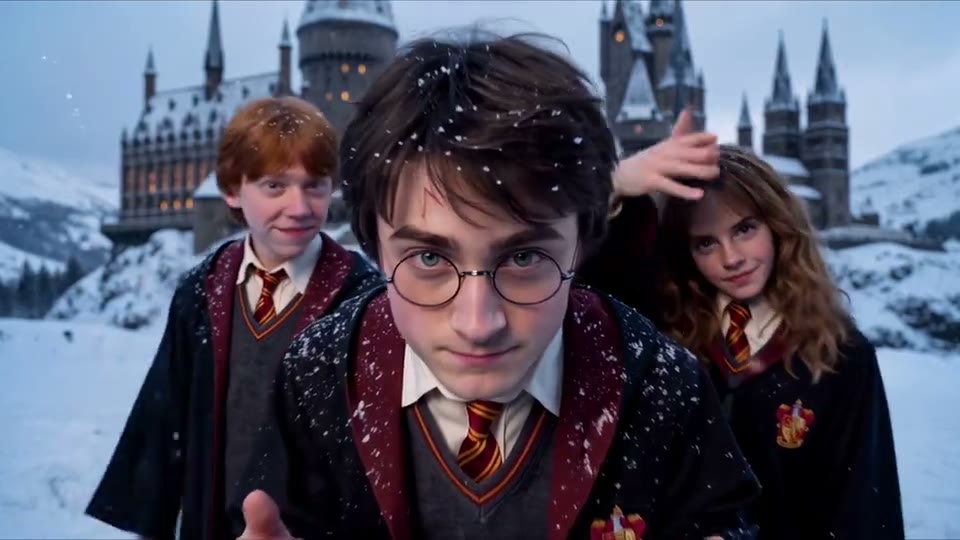
The camera starts close to one performer, swings to a friend, then turns to the next. Each gets a gesture or expression before the group returns to frame. This template follows that selfie sequence, with up to three portraits guiding the cast.
The included clip is a motion reference. It helps guide timing and framing; it does not guarantee an exact face swap, a particular dance step or perfect lip synchronization.
Choose up to three clear portraits of adults who agreed to appear. Keep faces visible and at a similar scale. Each photo gets a tag, @image_1 to @image_3, shown with its thumbnail in the prompt.
The starting prompt already gives @image_1 the left part, @image_2 the center and @image_3 the right. To recast, click a photo tag in the prompt and pick another photo, or type @ to insert one. Parts without a photo reuse yours, so one portrait can star alone.
Updated October 29, 2026
Upload up to three photos. The prompt shows each one as a photo tag; click a tag to recast that part, or type @ to tag a photo yourself.
The 19-second clip is included. Preview the camera turns or choose your own reference video directly below the photos, then check your prompt and Settings. The default is 19 seconds, 720p, landscape 16:9, with original reference sound off.
Review credits and the watermark condition. Sign in with Google and press Generate. Check every face, camera turn and audio track before downloading the MP4.
Choose the brief that matches your photos. Copying does not change your draft or start a video; paste it into the creator when ready.
The default. Upload up to three portraits. Tags assign each photo to left, center or right; parts without a photo reuse yours.
Use @image_1 for the left performer in @video_1, @image_2 for the center performer, and @image_3 for the right performer. Preserve each adult’s face, hair and outfit separately throughout the clip. Follow the reference sequence: center selfie close-up, a camera pan to each friend for their solo turn, then all three back in frame. Keep roles and identities consistent through the camera changes. No additional people, blended faces, captions or logos.
Keep the assigned cast and camera sequence, and ask for a new backdrop.
Use @image_1 for the left performer in @video_1, @image_2 for the center performer, and @image_3 for the right performer. Preserve each adult’s face, hair and outfit separately throughout the clip. Follow the reference sequence: center selfie close-up, a camera pan to each friend for their solo turn, then all three back in frame. Keep roles and identities consistent through the camera changes. No additional people, blended faces, captions or logos. Set the scene on an open rooftop with a softly lit city skyline at night. Keep the background simple and the faces unobstructed.
Keep the role mapping while requesting gentler camera motion. Exact motion matching can vary.
Use @image_1 for the left performer in @video_1, @image_2 for the center performer, and @image_3 for the right performer. Preserve each adult’s face, hair and outfit separately throughout the clip. Follow the reference sequence: center selfie close-up, a camera pan to each friend for their solo turn, then all three back in frame. Keep roles and identities consistent through the camera changes. No additional people, blended faces, captions or logos. Use slower pans, natural smiles and restrained hand movements. Keep each performer visible during their solo turn.
A new draft starts with 19 seconds of output and a 19-second video reference. Both output time and reference-video time contribute to the live credit quote. Changing duration, resolution or references changes the cost.
Preparing a draft does not spend generation credits. Generation requires Google sign-in and enough credits. Check the watermark condition for your account. See credit packs and subscriptions.
The reference is landscape, so 16:9 keeps the three-person composition. A vertical crop may lose people at the edges. Try a simple cast and review the entire clip.
The reference and examples contain audio. Keep original video sound starts off; inspect it in Settings. Audio retention and lip movement can vary. Use music you have permission to use.
This page follows the trio-selfie version: three people take turns at a front-facing camera, with quick pans and a group ending. AI remakes recast the performers using photos. It is different from a general horse-dance animation or a remake of the original PSY music video.
Upload up to three clear portraits, together or one at a time. The 19-second reference is included automatically. The default prompt gives @image_1 the left part, @image_2 the center and @image_3 the right; each tag shows its photo, and you can click it to pick a different one. Review the reference, prompt, duration, framing and sound setting, then check the credit quote. Sign in with Google and press Generate. Watch the entire result before downloading.
Parts are assigned in the prompt. Uploaded photos are numbered @image_1 to @image_3, and each tag in the prompt appears as a small chip with that photo. Click a chip to choose a different photo for that part, type @ to insert a photo, or use Insert photo on a phone. Replacing a photo keeps its tags; removing one marks its tags until you add a replacement. With fewer than three photos, empty parts reuse your uploads in order, so one portrait can play every part. Every tag in the prompt must still be present before generating. Identity and role matching are not guaranteed.
Yes. A 19-second landscape reference is attached to a new draft and can be previewed beside your photo. Use the visible Choose my reference video control to replace it, or Use included reference to restore the template clip. Settings also contains the reference list. Your portraits guide appearance while the video guides movement, timing and camera changes. Restored drafts keep their saved references and settings.
The reference and third-party examples contain audio. Keep original video sound starts off in a new draft; review this setting before generating. Turning it on requests preservation of the reference sound, but does not grant music rights or guarantee exact audio or lip synchronization. Use audio you have permission to use. This page has no separate song upload or voice-cloning control.
Browsing examples and preparing a draft do not spend generation credits. Generation requires Google sign-in and sufficient credits. The live quote reflects your output settings, video reference time and account watermark condition. The default uses a 19-second output and a 19-second reference; both contribute to the quote.
Use JPG, PNG or WebP files up to 10 MB with both sides at least 300 pixels and an aspect ratio between 0.4 and 2.5. Keep faces unobstructed. The starting output is 19 seconds, 720p and landscape 16:9 to match the reference. Settings offers 3–30 seconds, 720p or 1080p and other framing. Vertical output reframes the scene and may crop people.
The gallery contains third-party reference examples from SlapClip, with their input photos and actual clip durations. They illustrate the intended effect and are not Wondertake benchmark results. Results from this workspace can differ. Check faces, hands, camera changes and audio in your own output.
The workspace saves photos, reference video, prompt and settings in this browser, separately from Tiny Desk and Kling 4.0. Recovery depends on device storage and account ownership. Returning from sign-in or payment never starts generation automatically.
No. Wondertake is independent and is not affiliated with PSY, TikTok, SlapClip or the song’s rights holders. Only use photos and media you have permission to use, and identify your output as AI-generated when sharing.
Google sign-in and sufficient credits required. Results vary.