Skip to creator

AI Dog Dancing
Video Generator

Make your dog dance with Kling 2.6. Upload one photo, choose a dance and make a 5- or 10-second video.

Google sign-in required to generate.
Credits apply.

Make your dog dance

Start frame
Choose a dance

Watch the moves, then choose a dance for your photo.

K-pop Puppy selected. Changing the dance keeps your photo and settings.

Review your motion prompt before generating.842/2500 characters

Prepare your image and settings. Sign in to check your allowance and generate.

This video
Checking cost…
Balance
Checking balance…
This output
Checked with your quote

Guest and account workspaces are separate. After signing in, upload your image and review your settings before generating.

Checking for an unfinished request from this browser…

See the moves. Make them your own.

Watch two dance examples, then try one of the three prompts with your dog’s photo. Your result will vary with the image and motion you choose.

Still previewVideo
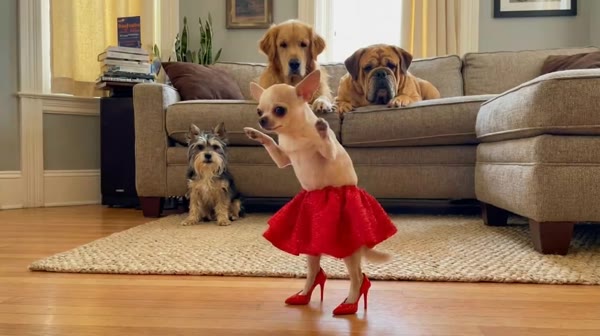
Tap-dancing Chihuahua Example · 10s
Still previewVideo
Playful Sway Example · 10s

Drag the divider to compare the still preview with the moving video. The stills are frames from these clips, not original input photos. Your Kling 2.6 video here is silent; add music afterward.

K-pop Puppy

Fast, sharp paw swings and side steps in a steady, centered shot.

Read and use this prompt
Motion prompt

A single puppy performing a fast-paced K-pop style dance choreography. The puppy is standing fully upright on its hind legs like a human, maintaining balance confidently. The dance features sharp, rhythmic, and energetic movements, inspired by K-pop idol choreography. Front legs move quickly and precisely, swinging widely left and right with clear accents, similar to synchronized K-pop arm movements. The lower body actively steps and shifts side to side, while the whole body moves dynamically with strong rhythm. The dance is high-energy, upbeat, and performance-focused, noticeably fast tempo, with large-amplitude, repeated, clearly defined movements. The puppy looks confident, playful, and expressive, like a stage performance. Static camera, medium shot, centered subject. Smooth animation, very strong motion clarity, high quality.

Add your own image, then review and Generate.

Playful Sway

Big paw swings and a bouncy side-to-side groove.

Read and use this prompt
Motion prompt

A cute puppy, exactly matching the appearance of the input image, standing fully upright on its hind legs like a human, maintaining balance. The puppy is energetically dancing: both front legs swing widely left and right, like exaggerated human arm movements, with clear, large-amplitude motion. The hind legs actively step and sway left and right, supporting the dance, the whole body strongly sways side to side. The dance is fast-paced, lively, and energetic, noticeably faster than normal movement, with continuous, repeated left-right swinging motion. The puppy looks happy and playful, full of energy. Static camera, medium shot, centered subject. Smooth animation, strong motion clarity, high quality, no interruptions.

Add your own image, then review and Generate.

Tap-Dancing Chihuahua

Quick little steps, a red tutu and a deadpan stare.

Read and use this prompt
Motion prompt

A tan Chihuahua standing upright on two hind legs, wearing a vibrant red pleated tutu skirt and miniature red high heels, performing rapid rhythmic Zapateado tap dance movements on a light hardwood floor in a domestic living room. The dog maintains an anthropomorphic upright posture with a stoic, deadpan facial expression while executing staccato, high-energy leg movements with precise heel-to-floor contact. Soft, diffused natural indoor lighting from a side window creates gentle shadows, warm color temperature. Background features a beige sofa with several dogs sitting stationary as passive observers. Static locked-off camera, medium-wide full shot, centered composition, 1:1 square aspect ratio, 30fps. High saturation on red costume elements contrasting against neutral tan and wood tones. Absurdist domestic surrealism style with continuous energetic performance. Audio: Upbeat funky music with strong bass groove, energetic and dominant.

Add your own image, then review and Generate.

How to make a dancing dog video

  1. 01

    Choose your star

    Upload a clear photo of one dog. Show its face, body and paws, with some space around it. A busy background or cropped legs makes movement harder to guide.

  2. 02

    Pick the moves

    Choose a dance in the creator, then adjust the prompt. Your photo is the starting frame. Playful Sway asks for the uploaded pet; Tap-Dancing Chihuahua specifies a tan dog and red costume, so edit those details to match your photo. Keep one short routine and a steady camera.

  3. 03

    Make the first take

    Review the settings and credit quote, sign in and press Generate. Check the dog’s face, paws and movement throughout the result, then download the MP4.

Give those paws some room.

A front-facing or three-quarter photo with the whole dog visible gives the model a useful starting point. Keep the eyes and coat markings clear. You do not need to make your dog stand or perform a real dance for the photo.

The dance is AI-generated. Upright poses can change proportions or paws, so a short solo is a good first test before a longer routine. Compare your dog’s coat markings, face and paws with the source photo at the start, middle and end of the clip. If the body distorts, try a smaller sway before asking for fast upright steps.

Choose the framing with your photo

Use a portrait photo for a vertical clip, or a square photo for a square composition. Leave room around the paws: this template uses your image as the starting frame, with no separate crop or aspect ratio control.

Want a particular dance? Describe the steps in the motion prompt. This photo-based template does not take a reference video.

Start short. Check the quote.

A new draft starts at 5 seconds. Choose 5 or 10 seconds in Output settings; Kling 2.6 uses its standard output quality. The creator shows the current credit cost before you generate.

Preparing a draft does not spend generation credits. Google sign-in and sufficient credits are required to generate. Review the watermark condition for your account. See credit packs and subscriptions.

A familiar creator, made for your dog

This template uses Kling 2.6 and saves a separate draft. Changing a dance preset keeps your photo and settings. Returning from sign-in or payment never starts a video automatically. Videos from this integration are silent, ready for you to add music afterward.

Updated November 17, 2026

Dog dancing questions, answered.

How do I make my dog dance with AI?

Upload one clear dog photo, choose a dance preset and edit the motion prompt if needed. Choose 5 or 10 seconds and review the current credit quote in the creator, then sign in and press Generate. Watch the full result before downloading the MP4.

What kind of dog photo works best?

Use one dog in even light, with its face and as much of its body and paws visible as possible. Leave space around the dog for movement. Upload JPG, PNG or WebP, up to 10 MB, with both sides at least 256 pixels. Cropped paws, heavy blur and several animals make the dance harder to guide.

Which dance preset should I choose for my dog photo?

Playful Sway asks the model to match your uploaded pet. K-pop Puppy asks for a faster upright routine. Tap-Dancing Chihuahua includes a tan Chihuahua, red tutu and red shoes; edit those details if they do not match your dog. Changing a preset updates the prompt, not your photo or output settings. Start with 5 seconds and review the quote before generating.

Which model does this dog dancing generator use?

This page uses Kling 2.6 through Wondertake’s existing image-to-video integration. Upload one photo and describe the movement.

Can I use my own dance reference video?

This Kling 2.6 template takes one starting photo and a motion prompt. It does not accept a reference video. Describe the steps you want in the prompt, or visit the Kling 4.0 workspace for a separate reference-video workflow.

Is it free to create a dancing dog video?

Preparing a photo, choosing a dance and editing a prompt do not spend generation credits. Generating requires Google sign-in and sufficient credits. The live quote shows the cost and watermark condition for your account. This page does not promise a free generation.

Will the video look exactly like my dog?

Choose Playful Sway to ask the model to match your uploaded pet, but results vary. The tap-dance prompt specifies a tan Chihuahua and a red costume, so edit those details for your dog. Upright movement may change paws, proportions or fur details. Check the entire clip before sharing and start with a short, simple dance.

Does it include music?

This existing Kling 2.6 integration generates silent videos. The examples have audio, and the tap-dance prompt mentions music, but that does not enable audio here. You can add music or sound effects afterward in your video editor or publishing app.

Can I change the dance without losing my photo?

Yes. Choosing a dance preset replaces only the motion prompt. Your photo and output settings stay in the creator. Your draft is saved in this browser separately from other Wondertake templates; generation still requires an explicit Generate action.

A little bounce.
A lot of personality.

Make your dog dance

One photo to start. Review the cost before you generate.